Adaptive inline banner
An adaptive inline banner is a flexible banner ad format that ensures maximum efficiency by optimizing ad size for each device.
With this ad type, developers can set the maximum allowable ad width and height, and the system determines the optimal ad size automatically. To choose the best ad size, adaptive inline banners use a maximum height instead of a fixed one. This helps improve performance.
Typically, this format is used in feed-based apps or contexts where it's acceptable to primarily focus user attention on ads.
Appearance
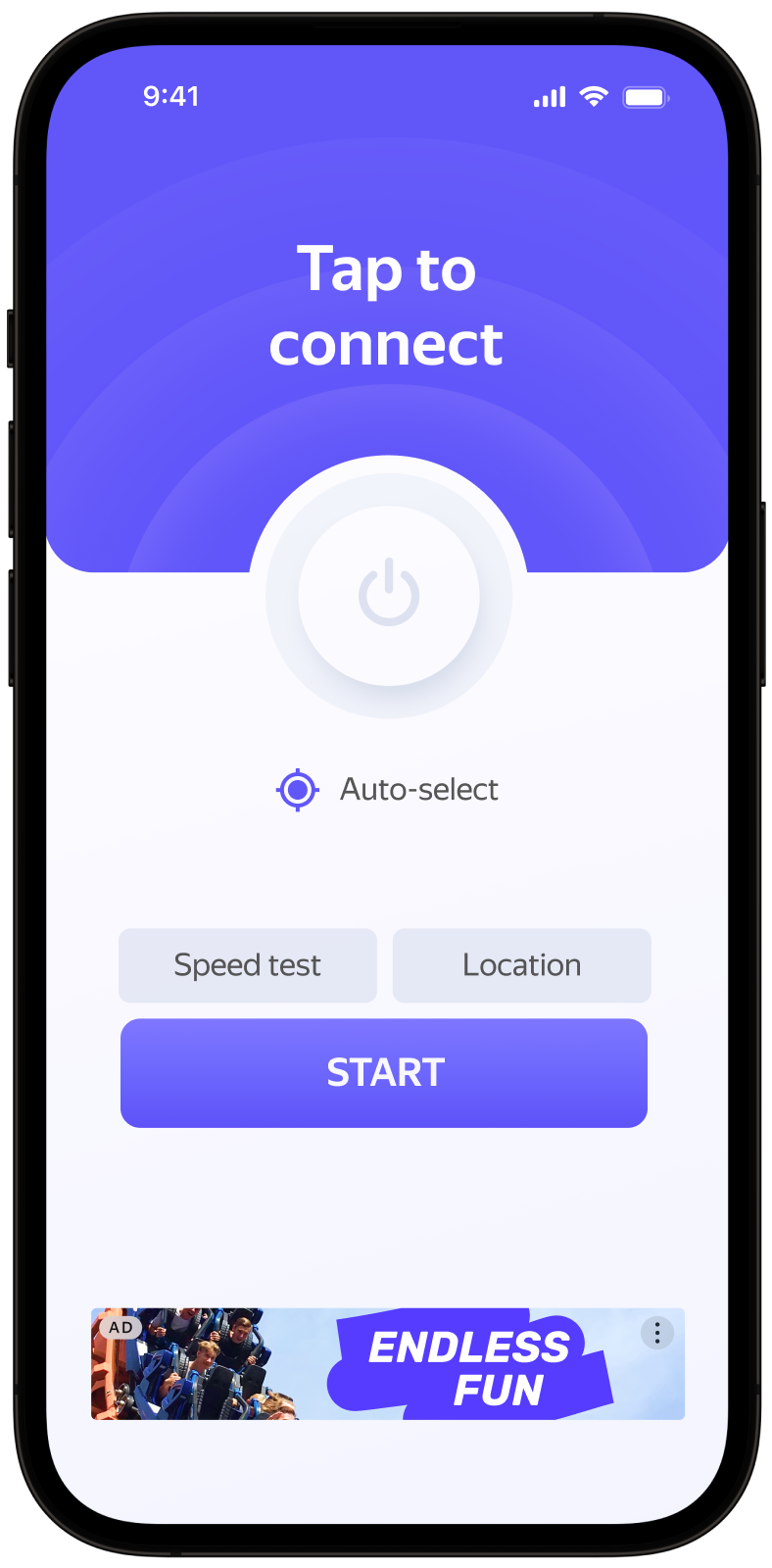
This guide covers the process of integrating adaptive inline banners into Android apps. Besides code samples and instructions, it contains format-specific recommendations and links to additional resources.
Prerequisite
- Follow the SDK integration steps described under Quick start.
- First, you need to initialize the advertising SDK.
- Make sure you have the latest Yandex Mobile Ads SDK version. If you're using mediation, update to the most recent single build version.
Implementation
Key steps to integrate an adaptive inline banner:
- Create and configure a view for displaying banner ads.
- Register a callback listener.
- Load the ad.
- Pass additional settings if you're using Adfox.
Specifics of adaptive inline banner integration
-
All calls to Yandex Mobile Ads SDK methods must be made from the main thread.
-
In order for video ads to show successfully on your app screen, hardware acceleration must be enabled. Hardware acceleration is enabled by default, but some apps may choose to disable it. If this applies to your app, we recommend enabling hardware acceleration for Activity classes that use ads.
-
If the
onAdFailedToLoad()callback returns an error, don't try to load a new ad again. If there's no other option, limit the number of ad load retries. This will help avoid constant unsuccessful requests and connection issues if there are limitations. -
For adaptive inline banners to work properly, make your app layouts adaptive. Otherwise, your ads might render incorrectly.
-
Adaptive inline banners work best when utilizing the full available width. In most cases, this will be the full width of the device screen. Be sure to consider the padding parameters set in your app and the display's safe area.
-
Adaptive inline banners are designed to be placed in scrollable content. Their height can be the same as the device screen or limited by the maximum height, depending on the API.
-
To get the size of the ad, use the method
BannerAdSize.inlineSize(context, adWidth, maxAdHeight), which accepts the context, the available width of the ad container, and the maximum acceptable ad height as arguments. -
The
BannerAdSizeobject calculated using theBannerAdSize.inlineSize(context, adWidth, maxAdHeight)method contains technical data for choosing the most optimal ad sizes on the backend. The height of an ad may change each time it is loaded. You can get the actual width and height of the ad after receiving a message confirming that the ad has been loaded successfully.
Rules for rendering interstitial inline banners
-
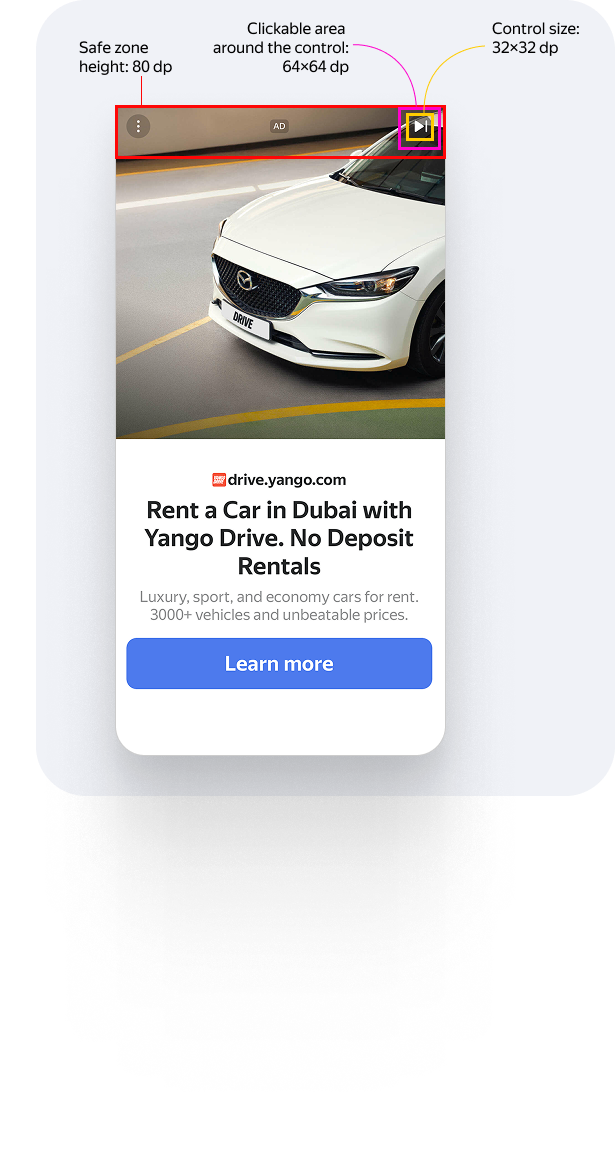
The height of the top non-clickable safe zone is 80 dp. Controls within the zone can be clickable.
-
Visual elements (assets) must be at least 32×32 dp in size. These include the Close button as well as all other icons.
-
Clickable area around assets must be at least 64×64 dp. For example, if an asset measures 32×32 dp, the padding around it must ensure that the total clickable area is 64×64 dp.
-
If a control appears with a delay, you must display a timer or progress bar until the element loads.
For example
Adding an ad view to the app layout
To display banner ads, add BannerAdView to your app layout. You can do that programmatically or by using an XML file.
Example of adding BannerAdView to an app screen layout:
# activity.xml
...
<com.yandex.mobile.ads.banner.BannerAdView
        android:id="@+id/ad_container_view"
        android:layout_width="match_parent"
        android:layout_height="wrap_content" />
...
You can also create a BannerAdView instance programmatically:
val bannerAd = BannerAdView(this)
final BannerAdView bannerAd = new BannerAdView(this);
Loading and rendering ads
Once you created and added BannerAdView to the app screen, you need to load the ads. Before loading an adaptive inline banner, calculate the ad size for each device.
This is done automatically via the SDK API method: BannerAdSize.inlineSize(context, adWidth, maxAdHeight). Pass the context, the available width of the ad container, and the maximum acceptable ad height as arguments. Adaptive inline banners work best when utilizing the full available screen width. In most cases, this will be the full width of the device screen. Be sure to consider the padding parameters set in your app and the display's safe area:
private val adSize: BannerAdSize
    get() {
        val screenHeight = resources.displayMetrics.run { heightPixels / density }.roundToInt()
        // Calculate the width of the ad, taking into account the padding in the ad container.
        var adWidthPixels = binding.adContainerView.width
        if (adWidthPixels == 0) {
            // If the ad hasn't been laid out, default to the full screen width
            adWidthPixels = resources.displayMetrics.widthPixels
        }
        val adWidth = (adWidthPixels / resources.displayMetrics.density).roundToInt()
        val maxAdHeight = screenHeight / 2

        return BannerAdSize.inline(context, adWidth, maxAdHeight)
    }
@NonNull
private BannerAdSize getAdSize() {
    final DisplayMetrics displayMetrics = getResources().getDisplayMetrics();
    final int screenHeight = Math.round(displayMetrics.heightPixels / displayMetrics.density);
    // Calculate the width of the ad, taking into account the padding in the ad container.
    int adWidthPixels = mBinding.adContainerView.getWidth();
    if (adWidthPixels == 0) {
        // If the ad hasn't been laid out, default to the full screen width
        adWidthPixels = displayMetrics.widthPixels;
    }
    final int adWidth = Math.round(adWidthPixels / displayMetrics.density);
    // Determine the maximum allowable ad height. The current value is given as an example.
    final int maxAdHeight = screenHeight / 2;

    return BannerAdSize.inline(this, adWidth, maxAdHeight);
}
To load ads, you also need the Activity context and the ad unit ID (adUnitId) you obtained in the interface Boost.
To enable notifications when ads load of fail to load and track an adaptive inline banner's lifecycle events, set the BannerAdEventListener callback listener for the BannerAdView class instance.
You can extend ad request parameters with the AdRequest.Builder() class to include information about the user's interests, page context, location, and other additional data in the ad request. Adding extra context to ad requests can greatly improve ad relevance. To learn more, see Ad targeting.
The example below shows how to load an adaptive inline banner. Once loaded, the banner is displayed automatically:
class AdaptiveInlineBannerAdActivity : AppCompatActivity(R.layout.activity_inline_banner_ad) {
    private var bannerAd: BannerAdView? = null
    private lateinit var binding: ActivityInlineBannerAdBinding

    private val adSize: BannerAdSize
        get() {
            val screenHeight = resources.displayMetrics.run { heightPixels / density }.roundToInt()
            // Calculate the width of the ad, taking into account the padding in the ad container.
            var adWidthPixels = binding.adContainerView.width
            if (adWidthPixels == 0) {
                // If the ad hasn't been laid out, default to the full screen width
                adWidthPixels = resources.displayMetrics.widthPixels
            }
            val adWidth = (adWidthPixels / resources.displayMetrics.density).roundToInt()
            // Determine the maximum allowable ad height. The current value is given as an example.
            val maxAdHeight = screenHeight / 2

            return BannerAdSize.inline(context, adWidth, maxAdHeight)
        }

    override fun onCreate(savedInstanceState: Bundle?) {
        super.onCreate(savedInstanceState)
        binding = ActivityInlineBannerAdBinding.inflate(layoutInflater)
        setContentView(binding.root)

        // Since we're loading the banner based on the adContainerView size,
        // we need to wait until this view is laid out before we can get the width
        binding.adContainerView.viewTreeObserver.addOnGlobalLayoutListener(object :
            ViewTreeObserver.OnGlobalLayoutListener {
            override fun onGlobalLayout() {
                binding.adContainerView.viewTreeObserver.removeOnGlobalLayoutListener(this);
                bannerAd = loadBannerAd(adSize)
            }
        })
    }

    private fun loadBannerAd(adSize: BannerAdSize): BannerAdView {
        return binding.banner.apply {
            setAdSize(adSize)
            setBannerAdEventListener(object : BannerAdEventListener {
                override fun onAdLoaded() {
                    // If this callback occurs after the activity is destroyed, you
                    // must call destroy and return or you may get a memory leak.
                    // Note `isDestroyed` is a method on Activity.
                    if (isDestroyed) {
                        bannerAd?.destroy()
                        return
                    }
                }

                override fun onAdFailedToLoad(adRequestError: AdRequestError) {
                    // Ad failed to load with AdRequestError.
                    // Attempting to load a new ad from the onAdFailedToLoad() method is strongly discouraged.
                }

                override fun onAdClicked() {
                    // Called when a click is recorded for an ad.
                }

                override fun onImpression(impressionData: ImpressionData?) {
                    // Called when an impression is recorded for an ad.
                }
            })
            loadAd(
                AdRequest.Builder("your-ad-unit-id")
                    // Methods in the AdRequest.Builder class can be used here to specify individual options settings.
                    .build()
            )
        }
    }
}
public class AdaptiveInlineBannerAdActivity extends AppCompatActivity {
    @Nullable
    private BannerAdView mBannerAd = null;
    private ActivityInlineBannerAdBinding mBinding;

    public AdaptiveInlineBannerAdActivity() {
        super(R.layout.activity_inline_banner_ad);
    }

    @Override
    protected void onCreate(@Nullable Bundle savedInstanceState) {
        super.onCreate(savedInstanceState);
        mBinding = ActivityInlineBannerAdBinding.inflate(getLayoutInflater());
        setContentView(mBinding.getRoot());

        // Since we're loading the banner based on the adContainerView size,
        // we need to wait until this view is laid out before we can get the width
        mBinding.adContainerView.getViewTreeObserver().addOnGlobalLayoutListener(
                new ViewTreeObserver.OnGlobalLayoutListener() {
                    @Override
                    public void onGlobalLayout() {
                        mBinding.adContainerView.getViewTreeObserver().removeOnGlobalLayoutListener(this);
                        mBannerAd = loadBannerAd(getAdSize());
                    }
                }
        );
    }

    @NonNull
    private BannerAdSize getAdSize() {
        final DisplayMetrics displayMetrics = getResources().getDisplayMetrics();
        final int screenHeight = Math.round(displayMetrics.heightPixels / displayMetrics.density);
        // Calculate the width of the ad, taking into account the padding in the ad container.
        int adWidthPixels = mBinding.adContainerView.getWidth();
        if (adWidthPixels == 0) {
            // If the ad hasn't been laid out, default to the full screen width
            adWidthPixels = displayMetrics.widthPixels;
        }
        final int adWidth = Math.round(adWidthPixels / displayMetrics.density);
        // Determine the maximum allowable ad height. The current value is given as an example.
        final int maxAdHeight = screenHeight / 2;

        return BannerAdSize.inline(this, adWidth, maxAdHeight);
    }

    @NonNull
    private BannerAdView loadBannerAd(@NonNull final BannerAdSize adSize) {
        final BannerAdView bannerAd = mBinding.banner;
        bannerAd.setAdSize(adSize);
        bannerAd.setBannerAdEventListener(new BannerAdEventListener() {
            @Override
            public void onAdLoaded() {
                // If this callback occurs after the activity is destroyed, you
                // must call destroy and return or you may get a memory leak.
                // Note `isDestroyed` is a method on Activity.
                if (isDestroyed() && mBannerAd != null) {
                    mBannerAd.destroy();
                }
            }

            @Override
            public void onAdFailedToLoad(@NonNull final AdRequestError adRequestError) {
                // Ad failed to load with AdRequestError.
                // Attempting to load a new ad from the onAdFailedToLoad() method is strongly discouraged.
            }

            @Override
            public void onAdClicked() {
                // Called when a click is recorded for an ad.
            }

            @Override
            public void onImpression(@Nullable ImpressionData impressionData) {
                // Called when an impression is recorded for an ad.
            }
        });
        final AdRequest adRequest = new AdRequest.Builder("your-ad-unit-id")
                // Methods in the AdRequest.Builder class can be used here to specify individual options settings.
                .build();
        bannerAd.loadAd(adRequest);
        return bannerAd;
    }
}
If you serve ads through Adfox, then after the banner ad response, the campaignId, bannerId, and placeId data can be accessed from the BannerAdView objects using the adAttributes property of the AdAttributes type.
Releasing resources
If a callback occurs after the Activity is destroyed, call the destroy() function for the used ad object to release resources:
private fun loadBannerAd(adSize: BannerAdSize): BannerAdView {
    return binding.banner.apply {
        setBannerAdEventListener(object : BannerAdEventListener {
            override fun onAdLoaded() {
                // If this callback occurs after the activity is destroyed, you
                // must call destroy and return or you may get a memory leak.
                // Note `isDestroyed` is a method on Activity.
                if (isDestroyed) {
                    bannerAd?.destroy()
                    return
                }
            }
            ...
        })
        ...
    }
}
@NonNull
private BannerAdView loadBannerAd(@NonNull final BannerAdSize adSize) {
    final BannerAdView bannerAd = mBinding.banner;
    bannerAd.setBannerAdEventListener(new BannerAdEventListener() {
        @Override
        public void onAdLoaded() {
            // If this callback occurs after the activity is destroyed, you
            // must call destroy and return or you may get a memory leak.
            // Note `isDestroyed` is a method on Activity.
            if (isDestroyed() && mBannerAd != null) {
                mBannerAd.destroy();
            }
        }
        ...
    });
    ...
    return bannerAd;
}
Testing adaptive inline banner integration
Using demo ad units for ad testing
Use test ads to check your adaptive inline banner integration and the app itself. To make sure that test ads are returned for each ad request, you can use a special demo ad placement ID.
Demo adUnitId: demo-banner-yandex.
Warning
Before publishing your app in the store, make sure to replace the demo placement ID with the real ID you obtained in the Boost interface.
For the list of all available demo ad placement IDs, see Demo ad units for testing.
Testing ad integration
You can check if your adaptive inline banners are integrated correctly using the SDK's built-in analyzer. A detailed report with the test results will appear in the log.
To view the report, search for the keyword “YandexAds” in Logcat, a tool for debugging Android apps.
adb logcat -v brief '*:S YandexAds'
If the integration is successful, the following message is returned:
adb logcat -v brief '*:S YandexAds'
mobileads$ adb logcat -v brief '*:S YandexAds'
I/YandexAds(13719): [Integration] Ad type banner was integrated successfully
If there are any banner integration issues, you'll get a detailed issue report and troubleshooting recommendations.
Additional resources
- Link to GitHub.