App open ad
App open ads are a special ad format for monetizing app load screens. These ads can be closed at any time and are designed to be served:
- When the app is launched.
- When the app is brought to the foreground.
- When returning to the app from the background.
This guide will show how to integrate app open ads into Unity apps. Besides code samples and instructions, it contains format-specific recommendations and links to additional resources.
Appearance
App Open Ads include a Go to the app button, which indicates to users that they're currently in your app and can close the ad.
Prerequisite
- Follow the Yandex Mobile Ads plugin integration steps described under Quick start.
- Make sure that you have the latest version of the Yandex Mobile Ads Unity Plugin. If you're using mediation, update to the most recent single build version.
Terms
- Cold start: Launching the app when it isn't present in RAM, which creates a new app session.
- Hot start: Bringing the app from the background, where it's paused in RAM, into the foreground.
Implementation
- Create an
AppOpenAdLoader. - Load the ad by calling the
AppOpenAdLoader.LoadAd(AdRequest)method — either viaasync/awaitor using callbacks. - Register listeners for events where users interact with your ad.
- Use
AppStateObserverto handle app status changes and display app open ads. - Show the ad by calling
AppOpenAd.Show(). - Release the resources.
Key steps
-
Create an
AppOpenAdLoader.using UnityEngine; using YandexMobileAds; using YandexMobileAds.Base; public class YandexMobileAdsAppOpenAdDemoScript : MonoBehaviour { private AppOpenAdLoader appOpenAdLoader; private AppOpenAd appOpenAd; private void SetupLoader() { appOpenAdLoader = new AppOpenAdLoader(); // ... } } -
Load the ad with the
LoadAdmethod.async/awaitCallbacksprivate async void RequestAppOpenAd() { string adUnitId = "demo-appopenad-yandex"; // replace with "R-M-XXXXXX-Y" try { appOpenAd = await appOpenAdLoader.LoadAd(new AdRequest(adUnitId)); } catch (AdLoadingException e) { // Ad failed to load with {e.Message} // Attempting to load a new ad from catch block is strongly discouraged. } }private void RequestAppOpenAd() { string adUnitId = "demo-appopenad-yandex"; // replace with "R-M-XXXXXX-Y" AdRequest adRequest = new AdRequest(adUnitId); appOpenAdLoader.LoadAd( adRequest: adRequest, onLoaded: appOpenAd => { // The ad was loaded successfully. Now you can handle it. this.appOpenAd = appOpenAd; }, onFailed: args => { // Ad failed to load with {args.Message} // Attempting to load a new ad from the onFailed callback is strongly discouraged. }); }adUnitId: A unique identifier that is issued in the Boost interface and looks like this: R-M-XXXXXX-Y.Tip
For testing purposes, you can use the demo ad unit ID: "demo-appopenad-yandex". Before publishing your ad, make sure you replace the demo unit ID with a real ad unit ID.
You can expand ad request parameters through
AdTargetingby passing user interests, contextual page data, location, or other additional info. Adding extra context to ad requests can greatly improve ad relevance. To learn more, see Ad targeting. -
Register listeners for events where users interact with your ad.
using System; // ... appOpenAd.OnAdClicked += HandleAdClicked; appOpenAd.OnAdShown += HandleAdShown; appOpenAd.OnAdFailedToShow += HandleAdFailedToShow; appOpenAd.OnAdDismissed += HandleAdDismissed; appOpenAd.OnAdImpression += HandleImpression; // ... public void HandleAdClicked(object sender, EventArgs args) { // Called when a click is recorded for an ad. } public void HandleAdShown(object sender, EventArgs args) { // Called when ad is shown. } public void HandleAdFailedToShow(object sender, AdFailureEventArgs args) { // Called when an ad failed to show. } public void HandleAdDismissed(object sender, EventArgs args) { // Called when an ad is dismissed. } public void HandleImpression(object sender, ImpressionData impressionData) { // Called when an impression is recorded for an ad. } -
Use
AppStateObserverto handle app status changes and display app open ads.using YandexMobileAds; public class YandexMobileAdsAppOpenAdDemoScript : MonoBehaviour { public void Awake() { // Use the AppStateObserver to listen to application open/close events. AppStateObserver.OnAppStateChanged += HandleAppStateChanged; } public void OnDestroy() { // Unsubscribe from the event to avoid memory leaks. AppStateObserver.OnAppStateChanged -= HandleAppStateChanged; } } -
Show the ad by calling
AppOpenAd.Show().private void HandleAppStateChanged(object sender, AppStateChangedEventArgs args) { if (!args.IsInBackground) { ShowAppOpenAd(); } } private void ShowAppOpenAd() { if (appOpenAd != null) { appOpenAd.Show(); } }Note
If the ad has already been served, calling the
AppOpenAd.Show()method will return a display error inHandleAdFailedToShow. -
Call
Destroy()for ads that are shown and clear links that are no longer used in the current scene.That releases the resources and prevents memory leaks.
public void DestroyAppOpenAd() { if (appOpenAd != null) { appOpenAd.Destroy(); appOpenAd = null; } }
Full code example
using System;
using UnityEngine;
using UnityEngine.UI;
using YandexMobileAds;
using YandexMobileAds.Base;
public class YandexMobileAdsAppOpenAdDemoScript : MonoBehaviour
{
private AppOpenAdLoader appOpenAdLoader;
private AppOpenAd appOpenAd;
private var isColdStartAdShown = false;
private void Awake()
{
DontDestroyOnLoad(gameObject);
SetupLoader();
AppStateObserver.OnAppStateChanged += HandleAppStateChanged;
RequestAppOpenAd();
}
private void OnDestroy()
{
AppStateObserver.OnAppStateChanged -= HandleAppStateChanged;
}
private void SetupLoader()
{
appOpenAdLoader = new AppOpenAdLoader();
}
private void HandleAppStateChanged(object sender, AppStateChangedEventArgs args)
{
     if (!args.IsInBackground)
     {
         ShowAppOpenAd();
     }
}

private void ShowAppOpenAd()
{
     if (appOpenAd != null)
     {
         appOpenAd.Show();
     }
}
private async void RequestAppOpenAd()
{
string adUnitId = "demo-appopenad-yandex"; // replace with "R-M-XXXXXX-Y"
try
{
appOpenAd = await appOpenAdLoader.LoadAd(new AdRequest(adUnitId));
// Add events handlers for ad actions
appOpenAd.OnAdClicked += HandleAdClicked;
appOpenAd.OnAdShown += HandleAdShown;
appOpenAd.OnAdFailedToShow += HandleAdFailedToShow;
appOpenAd.OnAdDismissed += HandleAdDismissed;
appOpenAd.OnAdImpression += HandleImpression;
if (!isColdStartAdShown)
{
ShowAppOpenAd();
isColdStartAdShown = true;
}
}
catch (AdLoadingException e)
{
// Ad failed to load with {e.Message}
// Attempting to load a new ad from catch block is strongly discouraged.
}
}
public void HandleAdDismissed(object sender, EventArgs args)
{
// Called when ad is dismissed.
// Clear resources after Ad dismissed.
DestroyAppOpenAd();
// Now you can preload the next ad.
RequestAppOpenAd();
}
public void HandleAdFailedToShow(object sender, AdFailureEventArgs args)
{
// Called when an ad failed to show.
// Clear resources.
DestroyAppOpenAd();
// Now you can preload the next ad.
RequestAppOpenAd();
}
public void HandleAdClicked(object sender, EventArgs args)
{
// Called when a click is recorded for an ad.
}
public void HandleAdShown(object sender, EventArgs args)
{
// Called when ad is shown.
}
public void HandleImpression(object sender, ImpressionData impressionData)
{
// Called when an impression is recorded for an ad.
}
public void DestroyAppOpenAd()
{
     if (appOpenAd != null)
     {
         appOpenAd.Destroy();
         appOpenAd = null;
     }
}
}
using System;
using UnityEngine;
using UnityEngine.UI;
using YandexMobileAds;
using YandexMobileAds.Base;

public class YandexMobileAdsAppOpenAdDemoScript : MonoBehaviour
{
    private AppOpenAdLoader appOpenAdLoader;
    private AppOpenAd appOpenAd;
    private var isColdStartAdShown = false;

    private void Awake()
    {
        DontDestroyOnLoad(gameObject);
        SetupLoader();
        AppStateObserver.OnAppStateChanged += HandleAppStateChanged;
        RequestAppOpenAd();
    }

    private void OnDestroy()
    {
        AppStateObserver.OnAppStateChanged -= HandleAppStateChanged;
    }

    private void SetupLoader()
    {
        appOpenAdLoader = new AppOpenAdLoader();
    }

    private void HandleAppStateChanged(object sender, AppStateChangedEventArgs args)
    {
        if (!args.IsInBackground)
        {
            ShowAppOpenAd();
        }
    }

    private void ShowAppOpenAd()
    {
        if (appOpenAd != null)
        {
            appOpenAd.Show();
        }
    }

    private void RequestAppOpenAd()
    {
        string adUnitId = "demo-appopenad-yandex"; // replace with "R-M-XXXXXX-Y"
        AdRequest adRequest = new AdRequest(adUnitId);
        appOpenAdLoader.LoadAd(
            adRequest: adRequest,
            onLoaded: HandleAdLoaded,
            onFailed: HandleAdFailedToLoad);
    }

    public void HandleAdLoaded(AppOpenAd appOpenAd)
    {
        // The ad was loaded successfully. Now you can handle it.
        this.appOpenAd = appOpenAd;

        // Add events handlers for ad actions
        this.appOpenAd.OnAdClicked += HandleAdClicked;
        this.appOpenAd.OnAdShown += HandleAdShown;
        this.appOpenAd.OnAdFailedToShow += HandleAdFailedToShow;
        this.appOpenAd.OnAdDismissed += HandleAdDismissed;
        this.appOpenAd.OnAdImpression += HandleImpression;

        if (!isColdStartAdShown)
        {
            ShowAppOpenAd();
            isColdStartAdShown = true;
        }
    }

    public void HandleAdFailedToLoad(AdFailedToLoadEventArgs args)
    {
        // Ad failed to load with {args.Message}
        // Attempting to load a new ad from the onFailed callback is strongly discouraged.
    }

    public void HandleAdDismissed(object sender, EventArgs args)
    {
        // Called when ad is dismissed.

        // Clear resources after Ad dismissed.
        DestroyAppOpenAd();

        // Now you can preload the next ad.
        RequestAppOpenAd();
    }

    public void HandleAdFailedToShow(object sender, AdFailureEventArgs args)
    {
        // Called when an ad failed to show.

        // Clear resources.
        DestroyAppOpenAd();

        // Now you can preload the next ad.
        RequestAppOpenAd();
    }

    public void HandleAdClicked(object sender, EventArgs args)
    {
        // Called when a click is recorded for an ad.
    }

    public void HandleAdShown(object sender, EventArgs args)
    {
        // Called when ad is shown.
    }

    public void HandleImpression(object sender, ImpressionData impressionData)
    {
        // Called when an impression is recorded for an ad.
    }

    public void DestroyAppOpenAd()
    {
        if (appOpenAd != null)
        {
            appOpenAd.Destroy();
            appOpenAd = null;
        }
    }
}
Features of app open ad integration
- Ads may take a long time to load, so you should avoid increasing the cold start time if the ad hasn't loaded.
- Preload ads for subsequent hot start impressions in advance.
- We don't recommend loading app open ads simultaneously with other ad formats at app startup, as the app may be downloading essential operational data. Doing so could lead to excessive loads on your device and internet connection, resulting in longer ad load times.
- If the load fails, don't attempt to load a new ad. If there's no other option, limit the number of ad load retries. This will help avoid constant unsuccessful requests and connection issues if there are limitations.
Testing App Open Ad integration
Using demo ad units for ad testing
Use test ads to check your ad integration and the app itself. To make sure that test ads are returned for each ad request, you can use a special demo ad placement ID.
Demo adUnitId: demo-appopenad-yandex.
Warning
Before publishing your app in the store, make sure to replace the demo placement ID with the real ID you obtained in the Boost interface.
For the list of all available demo ad placement IDs, see Demo ad units for testing.
Testing ad integration
You can check if your app open ads are integrated correctly using the SDK's built-in analyzer. A detailed report with the test results will appear in the log.
To view the report, search for the keyword “YandexAds” in Logcat, a tool for debugging Android apps.
adb logcat -v brief '*:S YandexAds'
If the integration is successful, the following message is returned:
adb logcat -v brief '*:S YandexAds'
mobileads$ adb logcat -v brief '*:S YandexAds'
I/YandexAds(13719): [Integration] Ad type App Open Ad was integrated successfully
If there are any ad integration issues, you'll get a detailed issue report and troubleshooting recommendations.
Using demo ad units for ad testing
Use test ads to check your ad integration at app launch and during your testing process. To make sure that test ads are returned for each ad request, you can use a special demo ad placement ID.
Demo adUnitId: demo-appopenad-yandex.
Warning
Before publishing your app in the store, make sure to replace the demo placement ID with the real ID you obtained in the Boost interface.
For the list of all available demo ad placement IDs, see Demo ad units for testing.
Testing ad integration
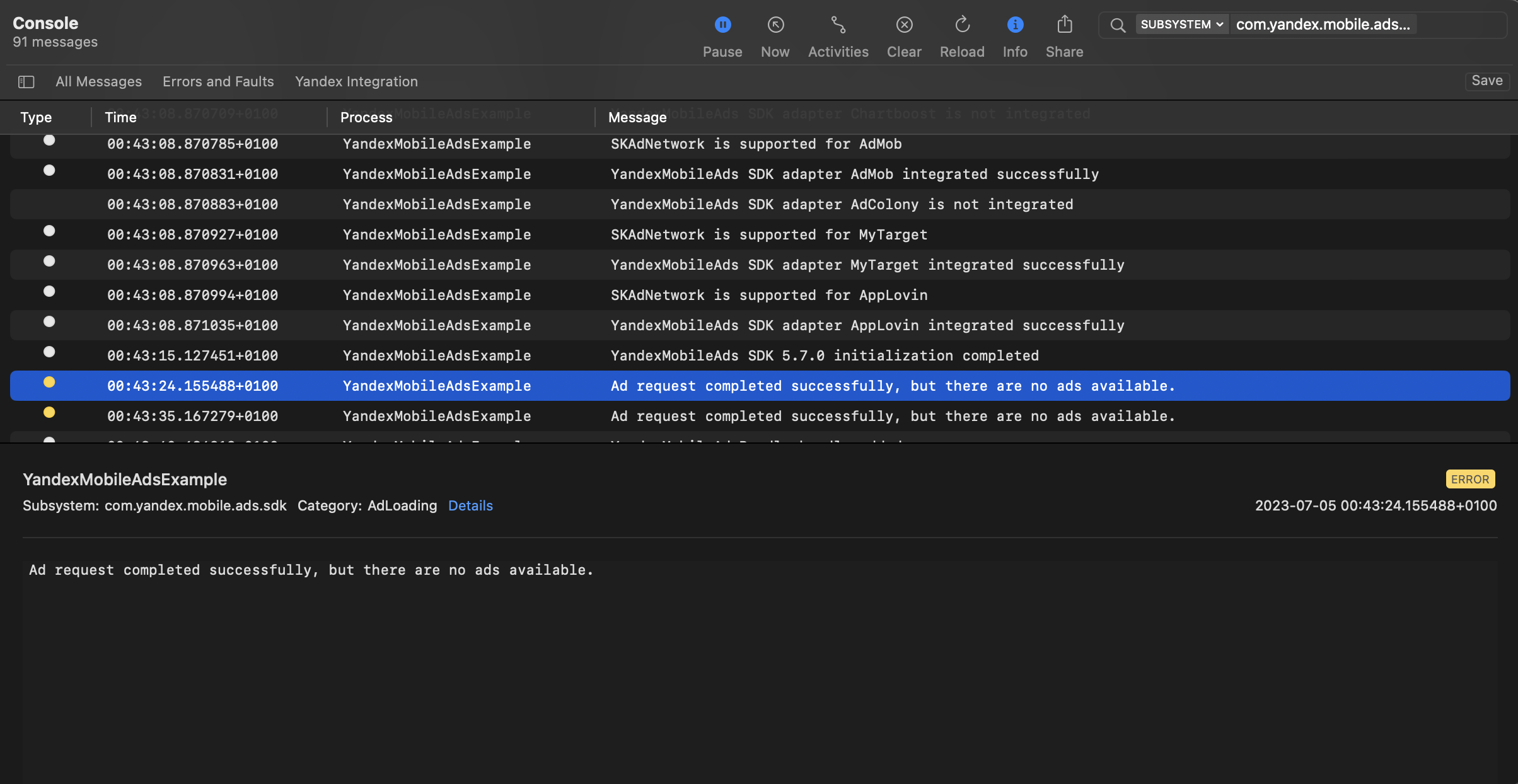
You can test your ad integration using the native Console tool.
To view detailed logs, call the YandexAds class's enableLogging method.
YandexAds.enableLogging()
To view SDK logs, go to the Console tool and set Subsystem = com.mobile.ads.ads.sdk. You can filter logs by category or error level.
If you're having problems integrating ads, you'll get a detailed report on the issues and recommendations for how to fix them.
Recommendations
-
We don't recommend showing App Open Ads before the app reaches the splash screen.
Showing the splash screen enhances the user experience, making it more intuitive. This way, the user will know that they opened the right app and won't be surprised or confused by the ad. On this screen, you can also warn users about the upcoming ad. To do this, use a loading indicator or a simple text message informing the user that they can continue viewing the app content after the ad.
-
If there's a delay between requesting and rendering the ad, the user might briefly open your app and then unexpectedly see an ad unrelated to the contents. This can negatively impact the user experience, so it's best to avoid such situations. One solution is to show the splash screen before displaying the main app content and to begin ad impressions from that screen. We don't recommend displaying an ad if the app has already opened content after the splash screen.
-
Wait for new users to open the app and use it a few times before starting to serve App Open Ad impressions. Show the ad only to users who meet specific criteria (for example, if they completed a particular level, opened the app a certain number of times, or don't participate in reward offers). We don't recommend displaying an ad immediately after the app is installed.
-
Adjust the frequency of impressions based on user behavior. We don't recommend serving an ad at every cold or hot app start.
-
Display ads only if the app has been running in the background for a certain time (for example, 30 seconds, 2 minutes, or 15 minutes).
-
Be sure to conduct tests, because each app is unique and requires its own approach to maximize revenue without sacrificing user retention or time spent in the app. User behavior and engagement may change over time, so we recommend periodically testing different display strategies for App Open Ads within your app.
Additional resources
- Link to GitHub.